
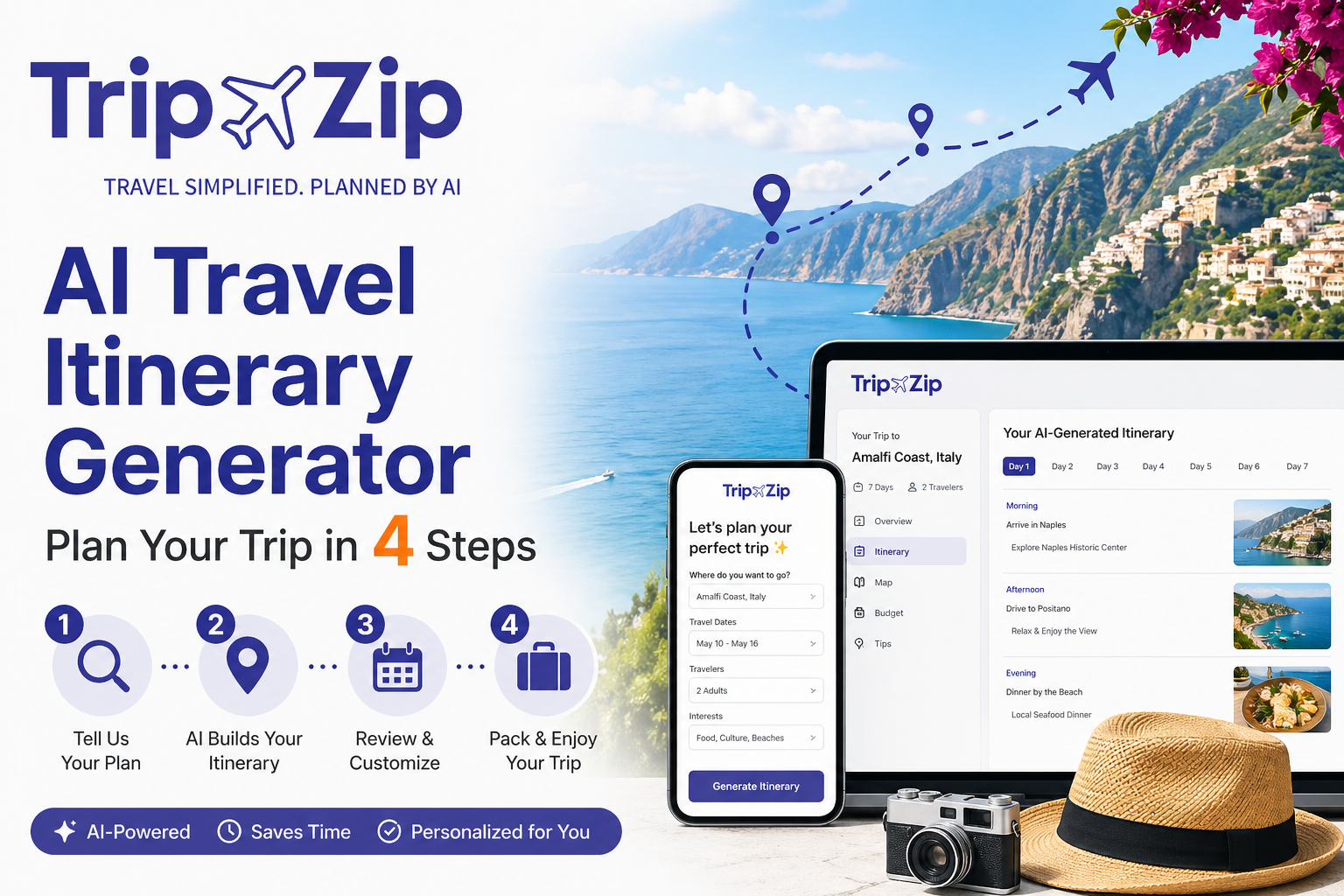
What is an AI Travel Itinerary Generator?
An AI travel itinerary generator is a tool that uses artificial intelligence to automatically build a complete, personalized travel plan based on your inputs — destination, dates, budget, travel style, and interests.
Unlike a basic search engine that hands you a pile of results to sift through, an AI itinerary tool processes thousands of data points simultaneously and delivers a structured, day-by-day schedule. Think of it as having a well-traveled friend who knows every city inside out, can read your mind about what you like, and never gets tired of planning.
The concept has been around since the early 2010s, but 2025 and 2026 marked a major turning point. Modern AI models can now understand nuanced context — they know the difference between a solo backpacker looking for hostels and community tours, and a couple celebrating their anniversary who want a private villa and Michelin-star dinners. The technology has matured enough to be genuinely useful, not just a novelty.
DID YOU KNOW: According to Expedia’s 2024 Travel Trends Report, travelers who used AI-assisted planning tools reported 34% higher satisfaction with their trips compared to those who planned entirely manually — largely because the AI helped surface experiences they wouldn’t have found on their own.
Who Should Use an AI Trip Planner?
Short answer: almost everyone. But it’s especially useful if you:
- Have limited time to research and want a solid plan fast
- Are visiting a destination you’ve never been to before
- Struggle with decision fatigue when faced with too many options
- Are planning a group or family trip with different preferences to juggle
- Want to optimize a tight budget without sacrificing experiences
- Need an itinerary you can edit and refine rather than start from scratch
If you’re the type who enjoys deep-dive research and building your own spreadsheet itinerary from scratch, AI tools still add value — they give you a smart first draft to react to, which is almost always faster than starting with a blank page.
How Does an AI Travel Itinerary Generator Actually Work?
The magic behind these tools is a combination of large language models (LLMs), geospatial logic, and real-time data integrations. Let’s break it down in plain English.
The Three Layers of AI Trip Planning
STEP 1 — Understanding Your Preferences
When you enter your destination, dates, group size, budget tier, and interests (like “food markets, coastal walks, no museums”), the AI parses this into a structured set of parameters. Modern tools analyze 50+ data points including your activity pace, dietary needs, mobility requirements, and even preferred wake-up time.
STEP 2 — Generating a Logical Route
This is where geospatial reasoning kicks in. The AI clusters nearby attractions together, respects travel times between locations, and avoids the classic “impossible itinerary” problem — where a chatbot might suggest breakfast in Rome and lunch in Naples without accounting for the 2.5-hour journey in between. Real transit data (trains, buses, ferries) is factored into every schedule.
STEP 3 — Surfacing Real, Bookable Options
Unlike a chatbot that pulls from training data (which might be a year out of date), dedicated AI travel planners connect to live APIs from booking platforms. This means the hotels, tours, and flights they suggest are actually available, at real current prices — not hypothetical options that no longer exist.
PRO TIP: The quality of your AI itinerary is directly tied to the quality of your inputs. Being specific about your travel style (“I like slow mornings, dislike guided tours, love local markets”) produces dramatically better results than generic inputs like “I like sightseeing.”
AI Chatbot vs. Dedicated Trip Planner: The Real Difference
This is a question that comes up constantly, and it matters more than most people realize. There’s a huge gap between asking ChatGPT “plan me a trip to Japan” and using a purpose-built AI travel itinerary generator.
“A chatbot tells you what’s possible. A dedicated travel planner tells you what’s actually available — right now, at your budget.”
General-purpose AI chatbots are genuinely impressive for brainstorming and understanding cultural context before a trip. But they have structural limitations for real travel planning:
- No live data — chatbots use training data with a cutoff date, so prices, hours, and availability are often outdated
- No geospatial logic — they don’t inherently know that two “nearby” attractions are actually 90 minutes apart by public transit
- No booking integration — you still have to manually search, compare, and book everything yourself
- Unstructured output — you get a wall of text that you have to organize into an actual schedule
Dedicated AI travel planning tools are built specifically to solve these problems. They combine AI intelligence with travel-specific data pipelines, giving you a structured, time-blocked, bookable itinerary rather than a list of suggestions you have to act on yourself.
The two approaches work well together. Use a chatbot for dreaming up destinations, understanding the vibe of a place. Use a dedicated planner to turn those ideas into a real, executable trip.
Step-by-Step: How to Create Your First AI Itinerary
Here’s a practical walkthrough that works with most AI travel planning tools available today. The exact interface varies, but the underlying process is the same.
STEP 1 — Lock In Your Logistics First
Enter your destination, exact travel dates, number of travelers, and any fixed constraints (like “we have a flight arriving at 2pm on Day 1”). These are your hard anchors — everything else will be built around them.
STEP 2 — Set Your Budget Tier Honestly
Most tools offer tiers like budget, mid-range, and luxury. Be honest here — the AI will filter accommodation, dining, and activities accordingly. If you’re between tiers, pick the lower one and manually upgrade specific elements afterward.
STEP 3 — Use the Interest Tags Strategically
Tags like “slow travel, food-focused, hidden gems, outdoor adventures, family-friendly, vegan-friendly, pet-friendly” act as non-negotiable filters. Use 3–5 specific tags rather than choosing everything — over-tagging leads to a generic plan that excels for no one.
STEP 4 — Generate, Then Refine (Don’t Just Accept)
Treat the first output as a 70% draft, not a final plan. Swap out activities that don’t resonate, adjust the daily pace, and check that routing makes geographic sense. Travelers who customize at least 3 activities report significantly higher satisfaction.
STEP 5 — Book Strategically, Not All at Once
Use embedded booking links for high-demand items first: popular restaurants, limited-capacity tours, and accommodation in peak season. A good AI planner will flag which items need early confirmation and which are fine to book on arrival.
YOUR PRE-TRIP AI CHECKLIST:
- Destination, exact dates, and traveler count confirmed
- Budget tier selected (be honest — mid-range ≠ budget airline + 5-star hotel)
- 3–5 specific interest tags chosen, not all of them
- Any dietary, mobility, or accessibility requirements noted
- First-draft itinerary reviewed for geographic logic
- High-demand items booked early (popular restaurants, entry-timed attractions)
- Offline PDF or calendar export saved for areas with poor connectivity
Top AI Travel Planners Compared (2026)
There are now dozens of AI travel planning tools on the market. Here’s an honest, side-by-side comparison of the key features that matter most for real-world trip planning:
|
Feature |
Dedicated AI Planners |
General AI Chatbots |
Traditional Booking Sites |
|
Real-time availability |
✓ YES |
✗ NO |
✓ YES |
|
Day-by-day schedule |
✓ Structured |
~ Text-only |
✗ NO |
|
Geospatial routing |
✓ Built-in |
✗ Limited |
✗ NO |
|
Budget filtering |
✓ Tier-based |
~ Manual |
~ Per-section |
|
Niche preferences |
✓ Tags/filters |
~ Prompt-based |
✗ NO |
|
One-click booking |
✓ Integrated |
✗ NO |
✓ YES |
|
Group collaboration |
~ Premium only |
✗ NO |
✗ NO |
|
Offline export |
✓ PDF/calendar |
~ Copy-paste |
~ Limited |
|
Free tier available |
✓ Most tools |
✓ YES |
✓ YES |
|
Planning speed |
✓ Under 60 sec |
~ 5–10 minutes |
✗ Hours |
The takeaway: dedicated AI travel planning tools are the fastest path from “I want to go somewhere” to “I have a confirmed, realistic plan.” They give you a 70–80% complete plan in the time it used to take just to pick a hotel.
7 Pro Tips to Get Dramatically Better Results from AI Trip Planning
After analyzing hundreds of AI-generated itineraries and talking with frequent travelers, here are the strategies that separate mediocre AI travel plans from genuinely excellent ones:
TIP 1 — Describe Your Travel Personality, Not Just Your Destination
Instead of “I want to visit Tokyo,” try “I’m an introvert who wakes up early, loves food markets and ceramics shops, gets overwhelmed by crowded tourist spots, and prefers to walk everywhere rather than take taxis.” That extra context produces a completely different (and far better) plan.
TIP 2 — Give the AI Your Deal-Breakers, Not Just Your Preferences
Stating what you don’t want is as powerful as stating what you do. “No chain restaurants,” “no tourist traps,” “no more than 3 activities per day” — these negative constraints tighten the output significantly.
TIP 3 — Generate Multiple Versions and Compare
Most tools let you regenerate with the same inputs. Running 2–3 versions and cherry-picking the best elements from each takes an extra 2 minutes but can dramatically improve your final plan.
TIP 4 — Use the Refine Feature for Routing, Not Just Activity Swaps
Before you finalize, check whether the day’s sequence makes geographic sense — north to south, not zigzagging across the city. This simple check saves hours of unnecessary travel.
TIP 5 — Build In Buffer Time Deliberately
AI tools are optimistic about travel time. Add a 15-minute buffer between activities in city centers, and 30–45 minutes between activities in different districts. This is the single most impactful adjustment you can make.
TIP 6 — Save Your Plan in Multiple Formats
Export as a PDF (offline use), sync with Google Calendar (day-of reminders), and screenshot Day 1. Old neighborhoods in European cities, Japanese ryokan districts, and Southeast Asian islands have notoriously patchy connectivity.
TIP 7 — Use the AI Plan as a Conversation Starter with Locals
Show your itinerary to your hotel receptionist or Airbnb host on Day 1. Locals will instantly spot the tourist-trap items and suggest hidden gems the AI missed. The best AI-assisted trips are hybrids — the machine handles logistics, the humans add the soul.
IMPORTANT NOTE: Always verify opening hours, visa requirements, and entry fees directly with official sources before your trip. AI tools update regularly, but venues can change hours seasonally or close unexpectedly. A quick 10-second check saves a lot of frustration at the door.
5 Common Mistakes When Using an AI Travel Itinerary Generator
Even great tools produce poor results when used poorly. Here are the most frequent pitfalls, and how to avoid them:
MISTAKE 1 — Over-Packing the Schedule
AI tools, when pushed, will fill every hour of your day. Plan for 3–4 meaningful experiences per day and treat everything else as a bonus. Travel fatigue is real, and the best memories often come from spontaneous detours you had time to take.
MISTAKE 2 — Ignoring the Geographic Reality
Always view your AI itinerary on a map before committing. A schedule that looks logical on paper can involve criss-crossing a city four times. A quick map check takes two minutes and can save hours of unnecessary travel.
MISTAKE 3 — Treating the First Draft as Final
The first AI output is a starting point, not a finished product. Budget 10–15 minutes for refinement after generating your initial plan — travelers who customize consistently report better experiences.
MISTAKE 4 — Choosing the Wrong Budget Tier
Mixing a “budget” accommodation selection with “luxury” dining preferences creates an internally inconsistent plan. Set your budget tier based on your overall daily spend comfort level, then manually adjust specific elements.
MISTAKE 5 — Not Accounting for Travel Days
On the day you fly in and fly out, your usable hours are dramatically reduced. Manually lighten the first and last day. Arriving at 4pm does not leave time for a full day of sightseeing, no matter how efficient your AI is.
Frequently Asked Questions
Q: What is the best free AI travel itinerary generator in 2026?
A: Several strong free options exist in 2026, including TripZip, Wanderlog, and Tripnotes. For quick single-destination planning with booking links, TripZip’s free tier is hard to beat. For multi-city road trips and collaborative editing, Wanderlog’s free version offers excellent map-based planning. Most free tiers cover basic planning well — premium upgrades typically unlock unlimited destinations, offline export, and group collaboration.
Q: How accurate are AI-generated travel times and routes?
A: Modern AI travel planners that integrate with live transit APIs are highly accurate — typically within a 10–15% margin. Where they struggle is highly localized knowledge: a route that looks logical on a map might involve a confusing train system or a steep hill not obvious from the data. Always add a 10–15 minute buffer between consecutive activities.
Q: Can I use an AI travel planner for international trips?
A: Yes — most dedicated AI travel planners have strong global destination coverage, particularly for popular destinations across Europe, Asia, the Americas, and Oceania. For very remote destinations, an AI tool is still useful for the logistics framework, but supplement with local tourism board resources or travel forums for hyperlocal knowledge.
Q: Is an AI-generated itinerary good for group travel?
A: AI trip planners handle group travel reasonably well — most let you specify group size, and some have collaborative features where multiple users can edit the same itinerary simultaneously. The AI optimizes for group consensus, filtering by the most restrictive preference in the group. This actually prevents the “we’ll find something when we get there” trap that ruins many group trips.
Q: How do I make an AI itinerary feel more personal and less generic?
A: Give the AI specific context about your travel personality — not just “I like food” but “I get up at 6am, love exploring local markets before they get crowded, hate museums unless they’re small and unusual.” Then spend 10–15 minutes in the refinement phase swapping out anything that doesn’t feel right.
Q: Do I need to create an account to use an AI trip planner?
A: Many AI travel planning tools let you generate a basic itinerary without signing up. However, creating a free account unlocks saving your plans and accessing them across devices. Avoid any tool that requires payment information upfront before letting you try the core planning feature.
Q: Can AI travel planners handle niche needs like vegan or accessible travel?
A: Yes — this is one area where dedicated AI travel tools genuinely shine over manual research. Most tools have specific filters for vegan/vegetarian dining, wheelchair accessibility, stroller-friendly routes, pet-friendly accommodation, and LGBTQ+-welcoming venues, drawing from curated databases and user reviews.
Related Topics & Keywords
AI trip planner free · travel itinerary maker · personalized travel itinerary · vacation planner app · automated trip planner · how to make a travel itinerary · smart travel planning 2026 · travel schedule generator · group travel planner AI · budget travel AI tool · custom travel plan generator · best AI vacation planner · one week trip planner · weekend trip itinerary AI · family trip planner AI
Ready to Plan Your Next Trip?
The best travel experiences start with a smart plan. Use an AI travel itinerary generator to get from “I want to go somewhere” to a fully structured, bookable trip — in the time it takes to finish your morning coffee.
Generate My Free Itinerary → https://tripzip.ai/create-plan